
AH88 GCash Promotions & Cashout Walkthrough
Learn how to claim bonuses and withdraw instantly using GCash on AH88. Transparent turnover conditions and zero hidden withdrawal fees.
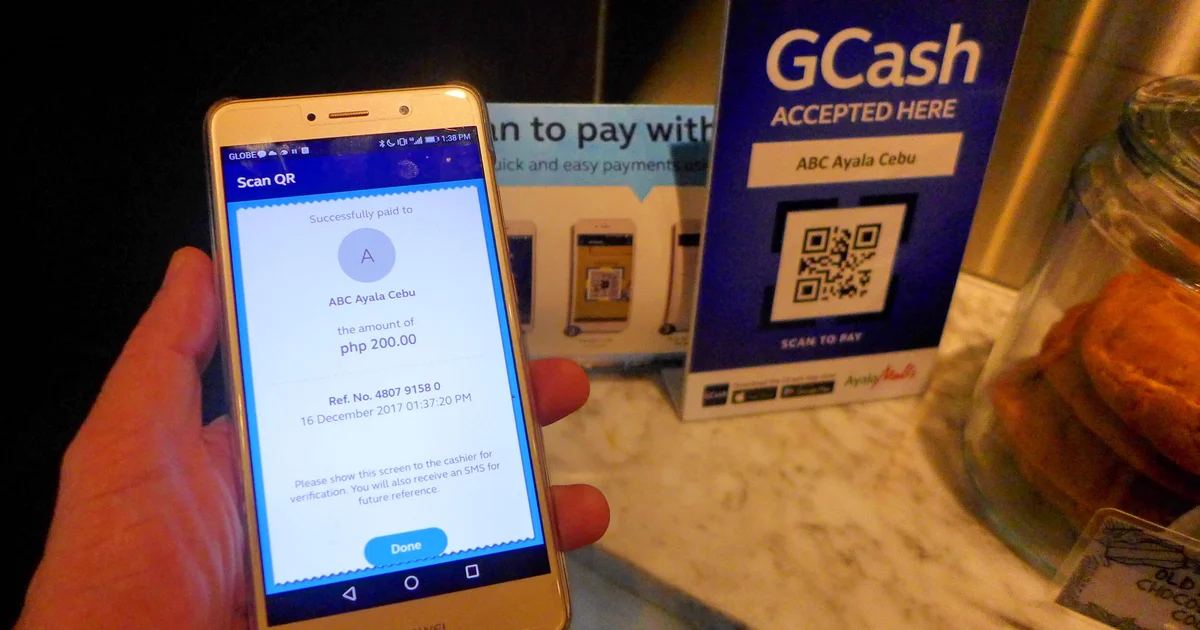
Funding your AH88 account is designed to be frictionless, fast, and secure for players living in the Philippines. By partnering with leading local payment channels—principally GCash and Maya—the platform allows you to cash in real-time without incurring third-party transaction surcharges.
However, understanding payment gateway mechanics, preserving transaction reference receipts, and knowing how to handle occasional network downtimes will ensure your gaming funds credit promptly every time.
This technical guide provides a step-by-step walkthrough for making deposits via GCash and Maya on AH88, outlines deposit thresholds, and offers practical troubleshooting workflows for delayed balance updates.
Supported Payment Channels & Transaction Specifications
AH88 supports multiple automated Philippine payment rails. Review the limits and settlement speeds for each method below:
| Payment Method | Minimum Deposit | Maximum Deposit | Processing Time | Transaction Fee | Gateway Protocol |
|---|---|---|---|---|---|
| GCash QR Pay | ₱100 | ₱50,000 | Instant (1–3 mins) | 0% | Dynamic Merchant QR Code |
| GCash Direct / Express | ₱100 | ₱30,000 | Instant (1–5 mins) | 0% | Webview API Redirect |
| Maya (PayMaya) | ₱100 | ₱50,000 | Instant (1–3 mins) | 0% | Static / Dynamic QR Ph |
| GrabPay | ₱200 | ₱20,000 | Instant (2–5 mins) | 0% | Mobile In-App Approval |
| Online Banking (InstaPay) | ₱500 | ₱50,000 | 5–15 mins | 0% | Bank Transfer Reference |
---
Step-by-Step GCash Deposit Walkthrough (QR Code Method)
The dynamic QR code scanning method is the most reliable deposit rail on AH88 because it eliminates manual account number typos. Follow these sequential steps:
Step 1: Access the Deposit Portal
Log in to your AH88 account. From your main lobby or account header, tap the Deposit (or Deposit / Cash-In) button.
Step 2: Select GCash and Payment Rail
Choose GCash from the available payment channels. If multiple server gateways appear (e.g., GCash-1, GCash-2), select the gateway with the green "Fast" indicator.
Step 3: Enter Your Deposit Amount
Type the amount of Philippine Pesos you wish to add to your balance (minimum ₱100). Quick-select denomination buttons (₱200, ₱500, ₱1,000, ₱5,000) are typically available for convenience.
Step 4: Opt In to Eligible Bonuses (Optional)
If you wish to participate in a first deposit match or daily reload promo, toggle the relevant bonus option on this screen. Ensure you understand the rollover terms before confirming.
Step 5: Generate and Capture the Dynamic QR Code
Tap Proceed to Pay. A dedicated merchant invoice window will display featuring a unique dynamic QR code. Take a screenshot of this QR code immediately.
Step 6: Execute the Transfer in GCash
1. Switch to your GCash application and log in with your MPIN.
2. Tap the QR button on the bottom navigation bar.
3. Select Upload QR (or Scan from Gallery/Photos).
4. Choose the screenshot of the AH88 dynamic QR code.
5. Verify that the merchant name and exact peso amount match your invoice.
6. Tap Pay to complete the transfer.
7. Save the final GCash transaction receipt showing your Reference Number (Ref No.).
Step 7: Verification and Balance Credit
Return to your AH88 browser window or mobile application. Refresh your balance display. In over 95% of transactions, funds appear in your wallet within 60 to 180 seconds.
---
How to Deposit via Maya (PayMaya)
If you prefer using Maya, the process follows a standardized QR Ph protocol:
1. In the AH88 deposit lobby, select Maya QR Ph.
2. Enter your cash-in amount (₱100 minimum) and tap Confirm.
3. Capture a screenshot of the generated QR Ph code.
4. Open the Maya app, tap Scan to Pay, and select the QR image from your photo album.
5. Review the payment details and tap Pay Now.
6. Save your Maya receipt; funds will reflect in your casino balance within 2 to 3 minutes.
---
Troubleshooting Delayed or Pending Deposits
If your deposit does not appear in your AH88 balance within 5 minutes, follow this diagnostic checklist:
| Issue / Error | Likely Root Cause | Solution Workflow |
|---|---|---|
| Funds debited from GCash, but casino balance remains ₱0.00 | Temporary API synchronization delay between GCash payment aggregator and casino server. | Wait up to 10 minutes; if still missing, send the GCash receipt screenshot and Ref No. to live chat. |
| "QR Code Expired / Invalid" | More than 5 minutes elapsed between QR generation and scanning. | Close the window, generate a fresh QR invoice in AH88, and scan the new code. |
| Transferred wrong amount (e.g., sent ₱550 instead of ₱500) | Payment amount must match the dynamic invoice precisely for automated API matching. | Contact customer support immediately with your transaction receipt to trigger manual balance adjustment. |
| GCash system downtime / Maintenance | GCash is running scheduled system maintenance or experiencing nationwide network timeouts. | Check official GCash advisory alerts; use Maya or online bank transfer as an alternative channel. |
---
Deposit Security Checklist for Players
To keep your personal finances completely protected while playing online:
- ☐ Never send funds to personal GCash numbers provided in social media messages or forum groups. Official AH88 deposits must always be initiated directly within the platform's deposit portal.
- ☐ Always double-check that your registered name on AH88 matches your GCash account name.
- ☐ Always capture and save your transaction receipts until the balance visibly updates in your casino wallet.
- ☐ Set personal gaming budgets: Decide on a fixed daily or weekly deposit ceiling before beginning your session.
---
Frequently Asked Questions
Does AH88 charge deposit fees on GCash or Maya?
No. AH88 processes all e-wallet deposits with 0% merchant fees. You will receive the exact peso amount you transfer.
What is the minimum deposit on AH88?
The standard minimum deposit across GCash and Maya channels is ₱100.
Can I deposit using a friend’s or family member’s GCash account?
No. Using third-party e-wallet accounts violates platform anti-fraud rules and will result in deposit rejection or severe withdrawal delays. Always use your personal, verified account.
---
AH88 GCash Promotions & Cashout Walkthrough Frequently Asked Questions